← Back to Service Overview

Cloud Migration Examples

Practical examples of how Sapient helps teams move internal apps, scripts, dashboards, file-based workflows, and lightweight data tools into secure, managed cloud environments that improve reliability, visibility, and long-term flexibility.

Cloud migration organizes the environment. People focus on the work.

Cloud migration image examples

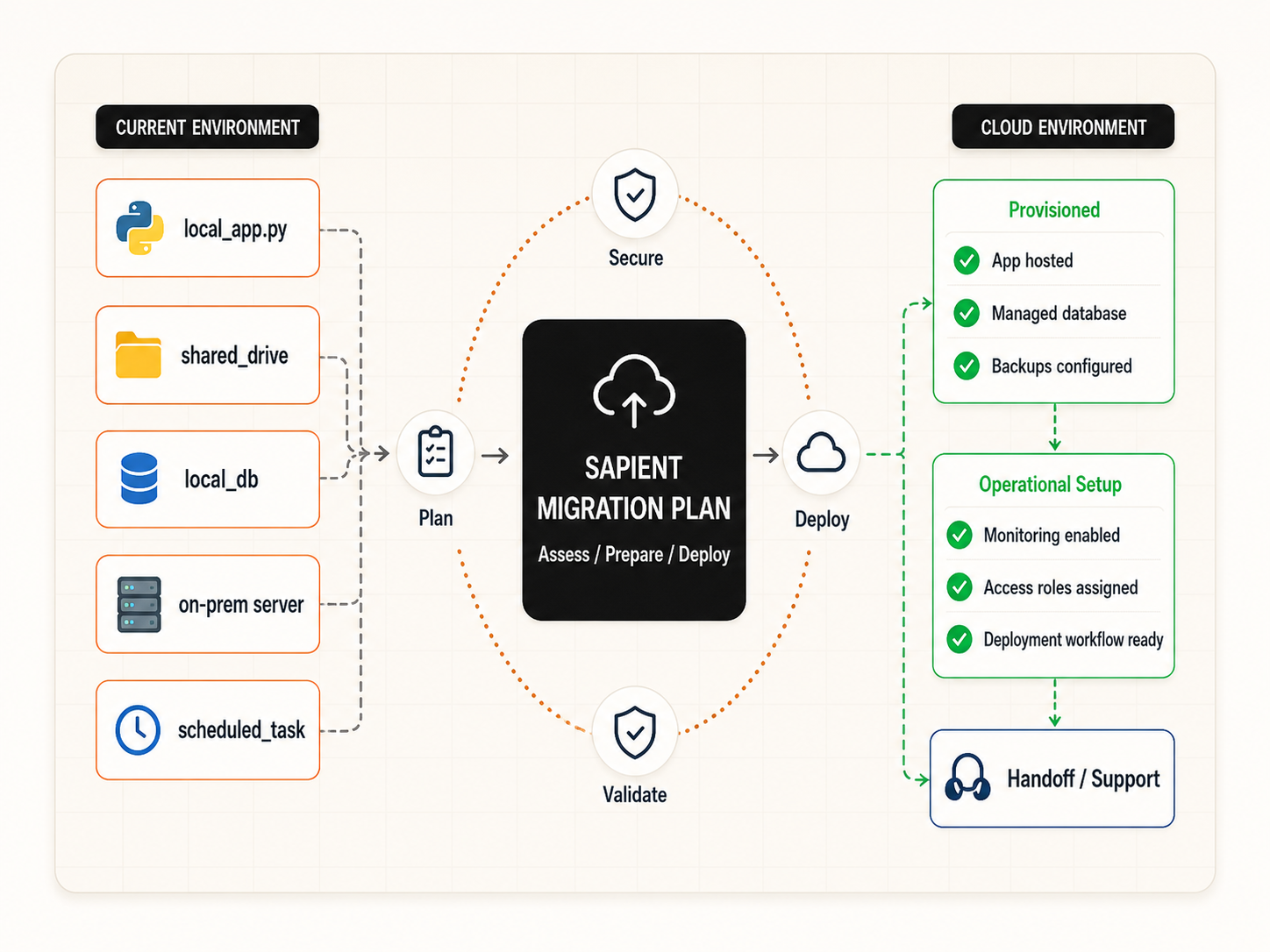
Cloud migration concept overview showing local apps, files, databases, and scheduled work moving into cloud infrastructure

Concept Overview

Move local apps, files, databases, and scheduled work into a secure cloud setup.

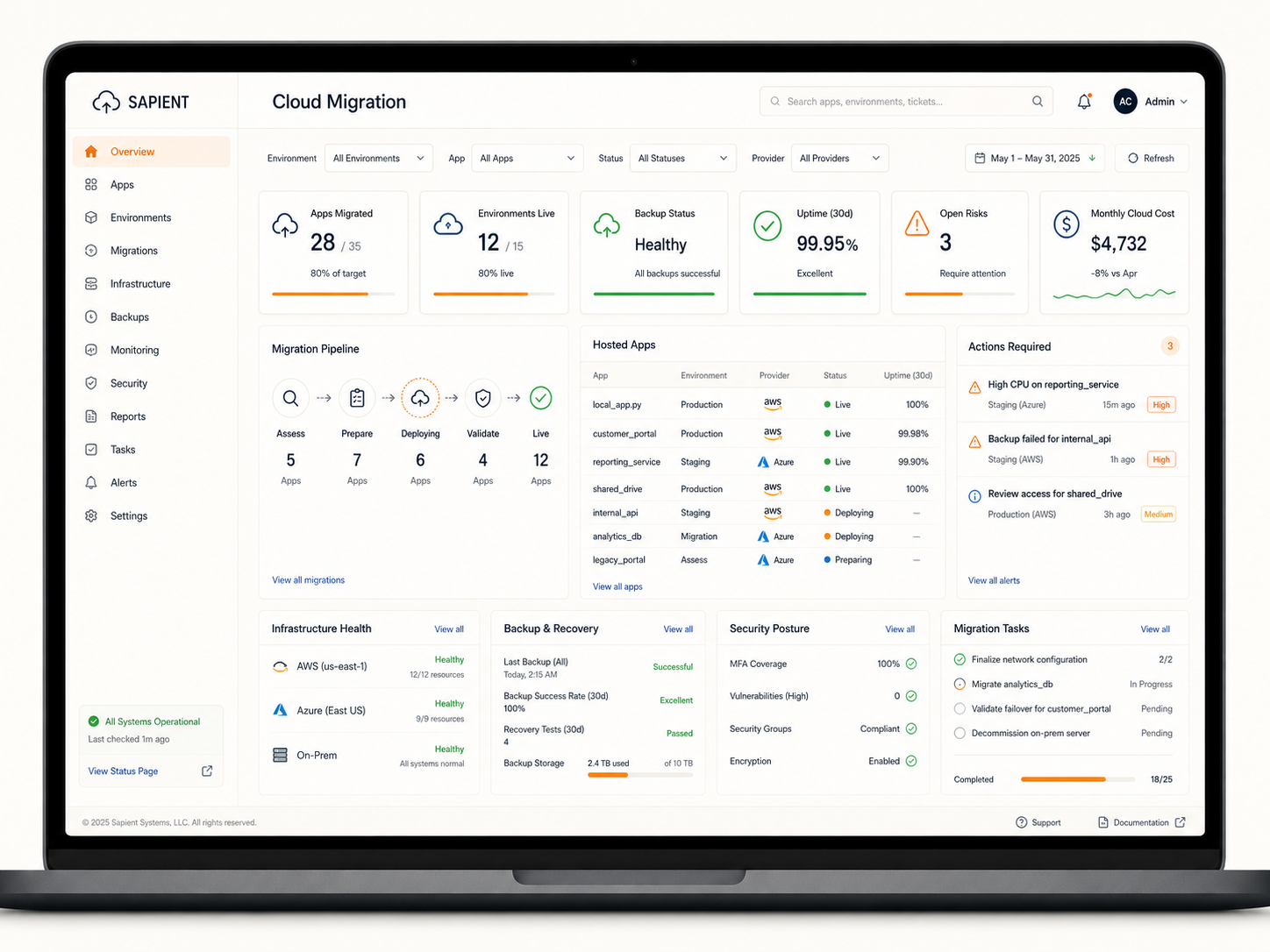
Cloud migration laptop dashboard showing apps, backups, uptime, risks, and migration tasks

Dashboard View

Track apps, backups, uptime, risks, and migration tasks in one control center.
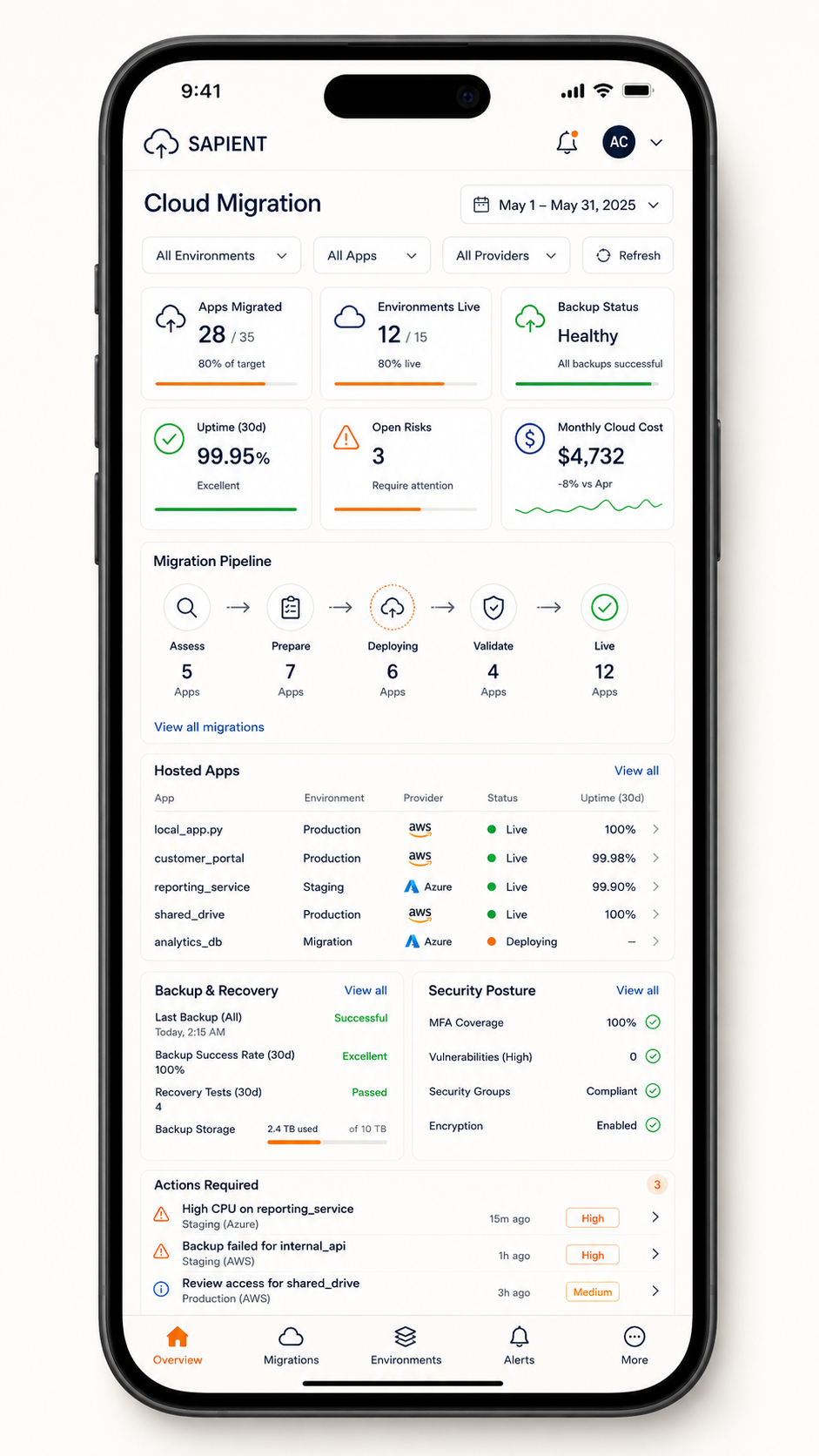
Cloud migration mobile view showing cloud health, hosted apps, and risks

Mobile View

Keep cloud health, hosted apps, and risks visible from mobile.

Cloud migration Examples

Internal Python App Migration

Challenge
Apps running on local machines, shared folders, or on-prem servers may lack reliability, access control, backup coverage, and scalability.
Sapient Solution
Migrate Python apps to AWS or Azure using a right-sized hosting setup, containerized deployment when appropriate, and documented handoff.
Business Value
Improves reliability, access, performance, and long-term maintainability.

Hosted Dashboards and APIs

Challenge
Dashboards, reports, scripts, and APIs may be manually run, hard to share, or dependent on one person's local environment.
Sapient Solution
Host dashboards and APIs in secure cloud environments with controlled access, deployment workflows, and monitoring.
Business Value
Creates consistent access, better performance, and easier sharing across the organization.

Managed Databases and Storage

Challenge
Local databases, files, and storage folders can create risk, limit access, and complicate backup or recovery.
Sapient Solution
Move structured data, app databases, and file storage to managed databases or cloud storage with backup and access controls.
Business Value
Improves reliability, lowers maintenance burden, and supports built-in backups.

Secure Access, Backups, and Monitoring

Challenge
Small internal tools often grow without formal access controls, backup routines, logging, or visibility into failures.
Sapient Solution
Implement identity controls, environment permissions, automated backups, logging, monitoring, and alerting.
Business Value
Improves security, reduces operational risk, and helps teams detect issues faster.

Modernize Local Tools and Spreadsheets

Challenge
Spreadsheets, local scripts, and desktop-based workflows can become fragile, hard to audit, and difficult to support.
Sapient Solution
Rebuild or wrap useful tools as cloud-hosted workflows, dashboards, data tools, or lightweight internal apps.
Business Value
Improves collaboration, reduces manual steps, and creates a clearer source of truth.

Ongoing Support and Environment Visibility

Challenge
After migration, teams may still need visibility into cloud health, usage, backups, costs, and support tasks.
Sapient Solution
Provide dashboards, alerts, documentation, support routines, and managed handoff so the environment remains usable and maintainable.
Business Value
Improves uptime, support clarity, and confidence in the migrated environment.

Example Workflow

Migrate Internal Python Apps

Challenge

A company has useful internal Python apps, scripts, dashboards, or scheduled jobs running on local machines, shared drives, or on-prem servers. The tools work, but they depend on fragile infrastructure, unclear access controls, manual deployments, or limited backup coverage.

Business Value

A cloud migration workflow helps move practical internal tools into a more reliable, secure, and supportable environment. Instead of depending on local machines or manual handoffs, teams gain clearer access, monitoring, backups, and a path for future improvements.

  1. Assess Current Environment

    Review apps, dependencies, data sources, users, schedules, access needs, and current infrastructure.

  2. Design Target Setup

    Choose the cloud provider, hosting model, networking approach, access controls, database/storage setup, and deployment pattern.

  3. Prepare and Migrate

    Package apps, move required data, configure environments, connect dependencies, and deploy workloads.

  4. Validate and Secure

    Test functionality, verify data access, configure permissions, confirm backups, and document the environment.

  5. Monitor and Support

    Enable monitoring, set alerts, track costs, review backups, and provide support or handoff documentation.

This pattern can be adapted to internal apps, reporting scripts, dashboards, lightweight APIs, scheduled jobs, shared data tools, databases, and other practical cloud moves for smaller teams.

Common signals we can work from

A practical cloud migration usually starts with existing tools, files, scripts, databases, and support routines that are already part of the team's daily work.

  • Internal Python apps or scripts
  • Local databases or file storage
  • Shared drives and network folders
  • Reporting scripts and spreadsheets
  • On-prem servers or virtual machines
  • Scheduled tasks or batch jobs
  • Manual deployment steps
  • Access lists and user roles
  • Backup routines or gaps
  • Environment documentation
  • Error logs or support issues
  • Handoff notes and operating procedures

What the output can show

  • Migration pipeline status
  • Hosted apps and environments
  • Uptime and performance
  • Backup success and recovery tests
  • Cloud cost and usage trends
  • Open risks and alerts
  • Security posture overview
  • Provider footprint
  • Task progress and history
  • Apps ready for handoff
  • Monitoring status
  • Actions requiring attention

Sample Stack Used - Representative tools and architecture we may use for practical cloud setup, app migration, secure hosting, and managed operations.


Software / Platforms

  • AWS / Azure
  • Docker and container hosting
  • Managed PostgreSQL / storage
  • GitHub Actions / monitoring tools

Architecture

  • Internal app hosting environments
  • Identity and access controls
  • Backups, logging, and observability
  • Partner-supported deployment planning

Languages / Interfaces

  • Python
  • SQL
  • YAML / Bash
  • REST APIs / admin consoles

Start With The Environment

Planning a smaller cloud move?

Sapient can help review your current apps, scripts, data tools, and infrastructure to identify the first practical steps toward a secure, reliable migration.

Start a Conversation